Utilities
The following actions are available on the utilities tab:
Backup (full)
Creates a full copy of your logger file. This can be used to transfer the logger to another machine, to store a copy of the logger for backup purposes, or to send the logger to a system administrator for support.
Backup (light)
Create a lightweight copy of your logger file. This is similar to the full backup described above, but it will remove export history and image files from the logger, in order to reduce the file size of the backup.
Clean logger
Provides a summary of the logger file size, and provides some options to clean-up and optimize the logger file.
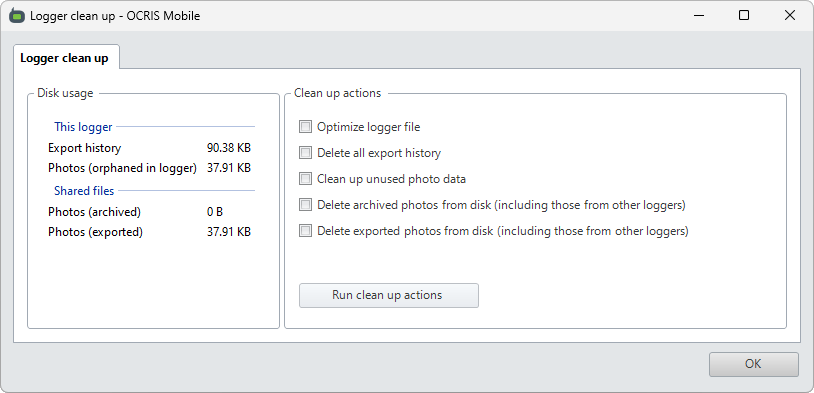
The options work as follows:
- Optimize logger file - This clean-up function will optimize the OCRIS Mobile logger file, reducing its size without affecting any data.
- Delete all export history - OCRIS Mobile keeps a backup copy of all exported data. This data is stored inside its logger file. This clean-up function will remove these copies.
- Clean up unused photo data - OCRIS Mobile keeps backup copies of photos that have been replaced, as well as photos from rows that have been deleted. This clean-up function will remove all of these photos.
- Delete archived photos from disk - OCRIS Mobile saves a backup copy of every archived photo to the hard drive. This clean-up function will remove all of these photos to free up some hard drive space. Note: This will clean up photos from all loggers on this computer, not just the current one.
- Delete exported photos from disk - OCRIS Mobile saves a backup copy of every exported photo to the hard drive. This clean-up function will remove all of these photos to free up some hard drive space. Note: This will clean up photos from all loggers on this computer, not just the current one.
Code export
Saves a copy of this logger's lookup codes to a CSV file.
Action export
Saves a copy of this logger's worksheet actions to a logger update package file (.ocmpkg). This update package can then be applied to another logger to import the saved worksheet actions.
External devices
This section is a work-in-progress and has not been finished yet