Data validation
OCRIS Mobile provides extensive data validation systems. By validating (and correcting) the collected data on the logger (before it's ever exported to the main database), OCRIS Mobile makes it easy to ensure that data is always accurate. It allows for early detection and correction of errors, maintaining data integrity and enabling informed decision-making. This process saves time and resources by addressing issues upfront, improving overall operational efficiency.
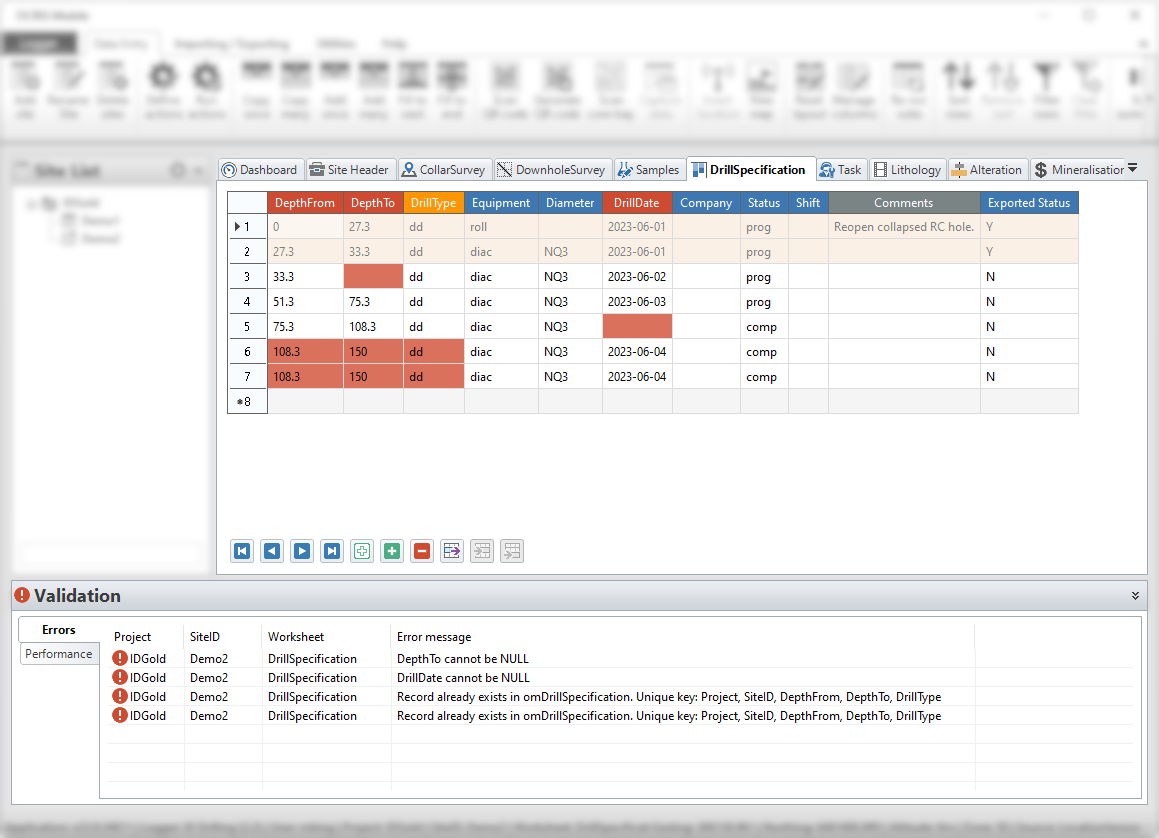
Validation rules
OCRIS Mobile's validation engine is powered by what we call "validation rules". These are set up by the logger administrator, and can be customized to catch all sort of data integrity issues so that they can be corrected by users during the data collection step.
Data errors that are detected by the validation rules are displayed to the users in two ways:
- The background color of a cell with a data error is set to red. The user can hover their mouse over the cell to see the error message and get hits on how to fix the error.
- All errors in scope are also displayed in the validation error list which is displayed in the bottom of the application. If the user double-clicks on an error, OCRIS Mobile will immediately jump to the relevant cell in the worksheet's datagrid.
Validation error list scope
The validation error list only shows the errors that are in the users current scope.
For example, if the user has selected a site and is working on a specific worksheet in that site, the validation list will only show errors for that particular worksheet within that particular site.
Here is a breakdown of how the validation error list scoping works:
| Site list selection | Worksheet selection | Errors shown |
|---|---|---|
| Project only | Dashboard | All errors, in every worksheet, for every site in the selected project. |
| Project only | Specific worksheet | All errors, in the specified worksheet, for every site in the selected project. |
| Project and site | Dashboard | All errors, in every worksheet, for that specific site. |
| Project and site | Specific worksheet | All errors, in the specified worksheet, for that specific site. |
Validation performance
The 'performance' tab of the validation list will show a list of every validation rule being run by OCRIS Mobile, as well as some performance statistics associated with that rule.
In general, this tab shouldn't be needed by most users of the software. Its purpose is to help diagnose performance issues in custom rules designed by administrators or third-party consultants.
If you notice that validation results take a long time to update after making changes to your data, it's possible that a poorly optimized rule is the cause. You can check the rule performance on this tab and raise the issue with your administrator or third-party consulant.